How to Unlink a Business
Unlinking an associated business will remove your account’s access to a business and its testing sites. Before unlinking, you may view the testing sites in the business by clicking the corresponding “View” button.
To unlink or disassociate your account from a business, log in to your account...
 On
CDPH Licensing Portal, click the
Laboratory Facilities icon to go to the laboratory licensing welcome screen:
On
CDPH Licensing Portal, click the
Laboratory Facilities icon to go to the laboratory licensing welcome screen:
 On the
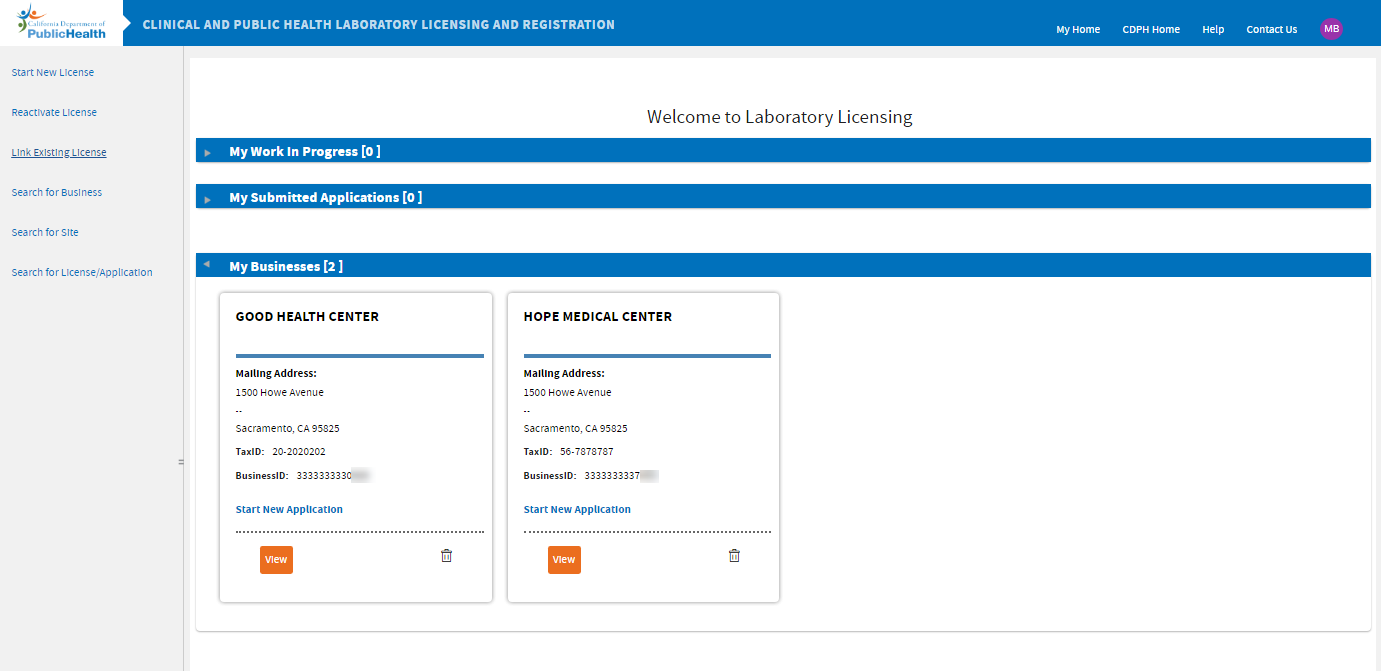
Laboratory Licensing welcome screen, you should see all the businesses linked to your account under the “My Businesses” stack. Look for the business you wish to unlink and click the
On the
Laboratory Licensing welcome screen, you should see all the businesses linked to your account under the “My Businesses” stack. Look for the business you wish to unlink and click the
trash bin icon.
 Confirm by clicking the
Submit button:
Confirm by clicking the
Submit button:
The business should no longer appear on your welcome screen.
Please note: Deleting a business from your account will not delete the business from our system. It will only unlink your account from the business. To link back, please click “Link Existing License” and follow the screen prompts.
-END-